Free HTTPS and SSL certificates
5 steps to take into account if you manually install your SSL certificate.
1. Request SSL
Indicate your domain name and the web server that hosts your site.
2. Verify your SSL
Next, validate that you have control of the domain. Verification varies depending on the type of certificate and web server.
3. Download your SSL
Download the primary and intermediate certificates from the SSL control panel.
4. Redirect from HTTP
Once installed, direct your visitors to the secure (HTTPS) version of your site. Check which option is right for you.
5. Confirm the installation
Enter your URL into a search engine. Look for the lock icon next to your URL. If present, you have completed the installation and your site is protected with SSL.
Reasons to buy an SSL certificate:
- We empower entrepreneurs and their communities
For more than 10 years, we have supported numerous entrepreneurs from more than 5 countries and we continue to progress to present you with our most cutting-edge solutions. In addition, we support community initiatives to continue fulfilling this purpose.
- You will have exceptional customer service
You can count on that you will always receive extremely friendly technical attention with deep knowledge from our webhostingfreecpanel.com Guides, who are security experts. Not to brag, but we have been honored with several Stevie速 Awards (a prestigious recognition given to companies that provide exceptional service).
- We are literally your Certification Authority
We provide our certified services through a robust Public Key Infrastructure (PKI) infrastructure, including global data centers, disaster recovery, redundancy and high availability. Additionally, we have been awarded the Online Trust Honor Roll and WebTrust awards.
Security imunify360
What is Imunify360 and how does it protect your business?
The security of your website is of utmost importance, as it forms the fundamental foundation of your business. It is natural that when developing our desired web portal, we choose to host it on a hosting service that, by default, provides high security against possible threats that circulate on the Internet.
It is crucial that your hosting account is completely protected in all aspects. If we refer to security in web hosting, then we are talking about Imunify360, a powerful ally that also has artificial intelligence to prevent injections of various types of viruses.
What is Imunify360?
Imunify360 represents highly robust security software designed for hosting servers, incorporating features such as advanced malware scanning and comprehensive intrusion detection. The intrusion detection component scans server logs for suspicious events, such as failed login attempts, and blocks the IP addresses associated with those events.
It is important to highlight that Imunify360 is a product developed by CloudLinux, the entity that created the operating system considered the most secure and stable for web hosting.
This software covers all possible security threats and makes use of innovative Artificial Intelligence (AI) technology to prevent malicious attacks. In addition, it has the ability to identify patterns of suspicious behavior in almost real time, allowing a rapid response to new attack attempts.
Benefits of Imunify360
- Advanced detection and detailed reporting on security threats, thanks to a sophisticated firewall with self-learning and collective protection capabilities.
- Protect your hosting service against a wide variety of threats, specifically addressing brute force attacks, which are the most common threat to web servers.
- It collects data from a global network to analyze and block potential attackers before they even try to compromise your website.
- It offers strong protection for web applications, preventing malware injections and defacement attacks.
- Automates security of the kernel and older versions of PHP.
- It stands out for its effectiveness in detecting false positives, thanks to an intelligent intrusion detection process that collaborates with the central intrusion detection system.
- It incorporates additional features such as domain reputation evaluation and an advanced Captcha system to verify the authenticity of website visitors.
- It is an adaptable system that performs frequent checks and scans for possible threats, without affecting the performance of your website.
In conclusion, it is important to remember that Imunify360 runs on our servers and is included in all the hosting plans we offer, whether for web hosting or wordpress hosting.
Firewall y HID
What is a firewall and what is it for?
The firewall, also known as a firewall in English, in the field of computing, is a security mechanism designed to prevent unauthorized access to a computer, while allowing authorized communication between said computer and other services. These devices are also used in computer networks, particularly intranets or local networks. The firewall is one of the first security measures implemented on computers after the emergence of the Internet.
These criteria undergo changes and evolve over time to stay current in the face of attacks that are also constantly evolving. It is crucial to note that firewalls do not eliminate malware trying to enter; They simply try to block your access. In case there is already a virus on the computer, the firewall has limitations and needs to be combined with an antivirus program to effectively address the situation.
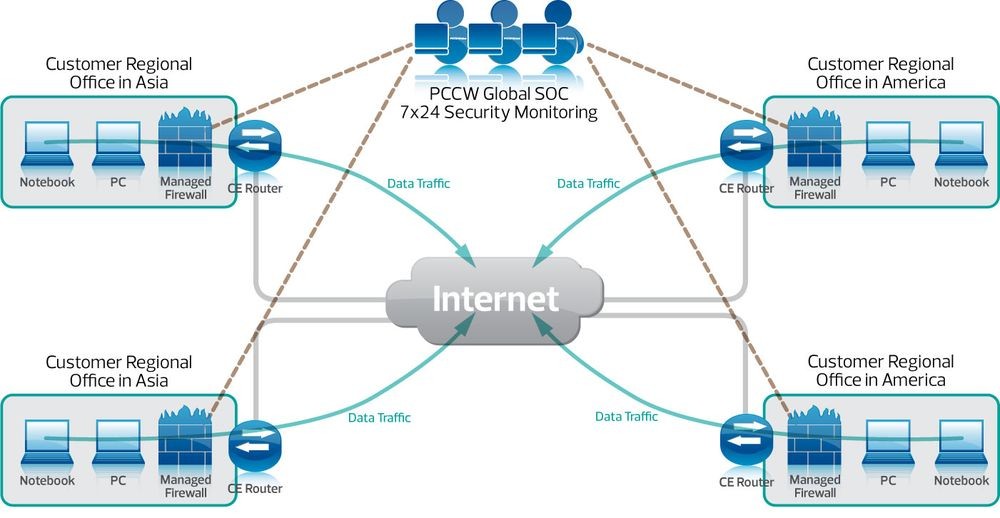
Firewalls can be classified into two categories, being software, hardware, or a combination of both. This means they can be apps you install on your computer or devices that connect to your computer to monitor traffic.
Physical firewalls can be standalone products or integrated directly into a router. Those independent ones are usually located between the Internet access point and the switch responsible for distributing the connection between computers within the same network. Pre-deployment of the network between computers means that all devices on an internal network are protected.
These are effective against numerous external attacks, especially for internal networks and intranets, making them useful tools for enterprises and large networks. However, they are not as safe against certain types of attacks that come through other applications, such as Trojans or threats received through fraudulent emails.
All PHP versions
Why you should use supported PHP versions
PHP is among the most widely used scripting languages on the web today. According to W3Techs, PHP is used in more than 78% of all websites that make use of a server-side programming language. This implies that approximately 8 out of 10 websites visited probably use some form of PHP, proving that PHP is still relevant. Furthermore, it plays an essential role in the WordPress ecosystem, as this entire CMS is based on PHP.
If you want to quickly check the PHP version, you can create a phpinfo page.
Today, we are faced with the dilemma that many companies, developers and hosting providers have been left behind in terms of compatibility with the latest versions of PHP. Some of the statistics that will be presented below may be surprising. In this context, we want to address some of the reasons why it is crucial for everyone to adopt the latest versions of PHP, not only for security reasons, but also for improved performance and more efficient support.
- Older PHP Versions
- Reasons Why You Should Update PHP Versions
- Make Sure Your Host Supports the Latest Versions of PHP
- Check Your Current PHP Version
- What Can Less Technical Users or Users with a Limited Budget Do?
- How to Update PHP
Old PHP versions
As with any piece of software, PHP has a release lifecycle that it has had to adhere to in order to continue to push things forward and make improvements. Each major version of PHP is usually fully supported for two years after its release. During that time, bugs and security issues are regularly fixed and patched.
PHP 5.6, 7.0, 7,1, 7.2, 7.3, y 7.4 – End of his life
End of life means that these versions will no longer receive security support and could be exposed to unpatched vulnerabilities.
- On November 28, 2022, the life cycle of PHP 7.4 ended.
-On December 6, 2021, PHP 7.3 reached end of life.
-As of November 30, 2020, PHP 7.2 has reached end of life.
-As of December 1, 2019, PHP 7.1 ended its life cycle.
-As of December 3, 2018, PHP 7.0 has reached end of life.
-As of December 31, 2018, PHP 5.6 also reached end of life. This officially marks the closing of an era for PHP 5, as the first version, 5.0, was released 14 years ago.
According to official WordPress statistics, at the time of writing, more than 55% of WordPress users are still using PHP 7.4 or earlier. Adding in other end-of-life versions of PHP, an overwhelming 85% of users are currently using versions that have been discontinued since November 2022.
The situation is even more worrying if you look at statistics outside of the WordPress community. According to W3Techs, PHP 5 is currently used on 22.9% of all sites using PHP.
This is not only problematic from a security standpoint, but also because these sites do not take advantage of the performance improvements that PHP 8.2 offers.
Reasons Why You Should Update PHP Versions
Examine some of the reasons below why you should consider upgrading if you haven't already:
1.Security
One of the most critical reasons to update PHP is to ensure that it is running on a fully supported version and is regularly patched to address security vulnerabilities. PHP 5.4 has not been patched since 2015, and PHP 5.5 has not been updated since 2016. It is important to note that some operating system vendors still offer updates for older versions of PHP if they included them.
According to CVE Details, 2016 was one of the years with the most security vulnerabilities in PHP, with more than 100 issues reported. These include denial of service (DoS) attacks, code execution, buffer overflow, memory corruption, cross-site scripting (XSS), directory traversal, bypass, among others. Last year, since 2000, was the third worst year with 40 vulnerabilities.
PHP, like any other extensive system, is in a constant process of scrutiny and refinement. Each new version usually incorporates significant and minor changes intended to improve security and correct possible bugs, faulty configurations and other problems that may affect the overall security and stability of the system. Following the same line as other languages and system-level scripting programs, the most effective strategy is to update regularly and stay aware of the latest versions and their modifications. In the case of PHP, the key is to stay up to date.
2. Performance Improvement
With the release of PHP 7.2, 7.3, 7.4, and 8.0, significant performance improvements were implemented. Version 8.1 shows even more advancements, and the newly released 8.2 features additional improvements. In fact, these improvements are so significant that they should be considered priority over many of the small optimizations you might be working on on your WordPress site.
We have also done our own PHP testing. As with previous performance analyses, we have observed that PHP 8.0 and 8.1 execute transactions (requests) per second significantly faster than previous versions.
Although Kinsta no longer supports PHP 7.4, we continue to support versions 8.0, 8.1, and 8.2.
3. Technical Assistance
Technical support is another reason why it is beneficial to use the latest and most supported versions of PHP. In many cases, plugin and theme developers can only guarantee backwards compatibility to a certain extent. This is largely due to time constraints and the inability to perform extensive compatibility testing with all previous versions. Eventually, issues will arise when running on older versions, and these issues are often evident on WordPress forums.
4. Innovations for Developers
Most WordPress developers would prefer to work exclusively with newer versions of PHP, as many new features have been introduced between PHP 5.2 and PHP 7.4. Some of the notable changes with PHP 7 and 7.3 include:
- Combined comparison operator
- Null coalescence operator
- New type of hint
- Anonymous classes
- Nullable types
- Iterable and null returns
- Multiple catch exception handling
- Keys usable in lists
- More negative sequence offsets
- Number of operators and malformed numbers
- HTTP/2 Server Push
- Preload
- Spread operator in array expression
- Arrow functions 2.0 (short closures)
- Null coalescence assignment operator
- Typed Properties 2.0
- Weak references
- Covariant returns and contravariance parameters
- New custom object serialization mechanism
It is not rewarding to back up old versions of any platform. Unfortunately, many developers are forced to maintain compatibility with a wide variety of versions.
PHP 8.0 introduces even more new features. Some of the most notable ones include:
- Named arguments
- Union types
- Builder property promotion
- Custom object serialization
- Match expression
- Nullsafe Operator
- Improvements to the type system and error handling
- And behind them come PHP 8.1 and PHP 8.2. Both versions incorporate new features, deprecations and modifications.
Make Sure Your Host Supports the Latest Versions of PHP
It took a considerable amount of time, but WordPress.org's official requirements now recommend a hosting provider running PHP version 7.3 or higher.
Recently, Yoast published a very informative article titled "Whipping Your Host Into Shape." In this article, Joost de Valk delves into the fact that the real problem lies in hosting providers not adopting these updates quickly enough, and even if they do, they are not encouraging users to upgrade. Yoast intends to address this issue and starting with Yoast SEO 4.5, they plan to display a notice in the WordPress dashboard for sites running on PHP 5.2. This notice will be prominent, eye-catching and cannot be dismissed.
If we could give Yoast a high five, we would. At Kinsta, we've consistently supported the latest versions of PHP with every stable release.
Update: PHP 8.2 (official release) is now available for all Kinsta customers. Kinsta no longer supports PHP 7.4. It is important to note that we support PHP versions 8.0, 8.1 and 8.2.
We are dedicated to creating the fastest and most secure environment on the market, which means ensuring that all sites use technologies that actively receive security updates.
We invite you to consult our detailed guide with step-by-step instructions on how to safely update PHP on your WordPress site.
Check Your Current PHP Version
You may not be aware of the current version of PHP you are using on your WordPress site. Here are several ways to find out:
Check PHP Version with Pingdom
One of the easiest ways to check the PHP version is to use tools like Pingdom or Google Chrome DevTools. The first header of the HTTP request usually reveals the version used.
NodeJS
What is Node.js and why you should use it
JavaScript is one of the most prominent programming languages in the world. Today, it powers countless websites and has attracted numerous developers and designers to create web features. If you are taking your first steps in programming, JavaScript is undoubtedly one of the most appropriate languages to start with.
For its first two decades, JavaScript was primarily used for client-side scripting. Since JavaScript was restricted to the "script" tag, developers had to work with multiple languages and frameworks between front-end and back-end components. Later, Node.js emerged, a runtime environment that provides everything needed to run programs written in JavaScript.
Node.js is an open source, cross-platform, single-threaded runtime environment designed for building fast and scalable server-side and networking applications. It runs on the JavaScript V8 runtime and adopts a non-blocking, event-driven I/O architecture, making it efficient and suitable for real-time applications.
What is Node.js written in?
Node.js is a "packaged compilation of Google's V8 JavaScript engine, the libuv platform abstraction layer, and a core library, which itself is written primarily in JavaScript."
The Node.js runtime internally uses the Chrome V8 JavaScript runtime, which is written in C++. This expands Node.js use cases, allowing access to internal system functionality such as network manipulation.
Node.js architecture and how it works
Node.js uses the “Single Threaded Event Loop” architecture to handle multiple clients at the same time. To understand how it is different from other runtimes, we have to understand how multithreaded concurrent clients are handled in languages like Java.
In a multithreaded request-response model, multiple clients send a request and the server processes each request before returning the response. However, multiple threads are used to process concurrent calls. These threads are defined in a thread pool, and each time a request arrives, an individual thread is assigned to handle it.
Node.js operates differently. Let's examine each phase of the process:
- Node.js maintains a limited set of threads to handle requests.
- Every time a request arrives, Node.js queues it.
- The "event loop", the main component of a single thread, comes into play. This event loop waits indefinitely for requests.
When a request arrives, the event loop picks it up from the queue and checks to see if it requires a blocking input/output (I/O) operation. If this is not the case, it processes the request and sends a response.
In the case of a request that involves a blocking operation, the event loop assigns a thread from the limited set of internal threads to process the request. These available internal threads form a group known as a worker pool.
The event loop tracks blocked requests and places them in the queue once the task that caused the blocking is completed. This methodology ensures that Node.js retains its non-blocking nature.
Since Node.js uses fewer threads, it also requires fewer resources and memory, resulting in faster execution of tasks. Therefore, for real-time applications, where speed is crucial, the single-threaded architecture of Node.js is presented as an efficient option, despite being different from the multi-threaded architecture, such as that of Java, which is used to process large data sets.
Node.js Features
Node.js has seen rapid growth in recent years, thanks to its extensive feature set:
1. Ease of use: Node.js is relatively easy to learn, making it a friendly option for beginners in web development. With plenty of tutorials and an active community, starting projects is easy.
2. Scalability: Offers excellent scalability for applications. Despite being single-threaded, Node.js can handle a large number of simultaneous connections with high performance.
3. Speed: Block-free thread execution makes Node.js especially fast and efficient.
4. Packages: It has an extensive set of open source packages in the NPM (Node Package Manager) ecosystem, which can simplify development. Currently, there are over a million packages available.
5. Robust support: Node.js is implemented in C and C++, giving it speed and features like networking support.
6. Cross-platform: Cross-platform support allows the development of SaaS websites, desktop applications, and even mobile applications using Node.js.
Easy maintenance: Node.js is a convenient choice for developers as both the frontend and backend can be managed with JavaScript, unifying the programming language across the project.
MariaDB 10.5
Databases
MariaDB Server is one of the most prominent open source relational databases, created by the original developers of MySQL. It is assured to remain an open source solution and is widely adopted, forming part of most cloud offerings and being the default option on many Linux distributions.
This database is founded on principles of performance, stability and openness, with the MariaDB Foundation ensuring that contributions are accepted based on technical merit. Recent enhancements include advanced clustering features with Galera Cluster 4, functionality compatible with Oracle Database, and temporary data tables that make it possible to query data as it was at any time in the past.
MariaDB Tutorial
MariaDB is an open source relational database management system (RDBMS) that acts as a direct and highly compatible replacement for MySQL.
MariaDB originated as a software fork of MySQL in 2009, in response to Oracle's acquisition of MySQL. Its main objective is to remain free and open source software, under the GNU General Public License.
The MariaDB tutorial website provides practical knowledge and skills so that users can master MariaDB quickly and effectively. To get the most out of these tutorials, familiarity with relational database management systems (RDBMS) concepts is recommended, but not required.
Python
What is Python
Python is an open source programming language that was created by Guido van Rossum in 1991. This language is object-oriented and is characterized by being easy to interpret, with a syntax that allows it to be read in a similar way to the English language. Python is an interpreted language, which means that the programming code is converted into bytecode and then executed by the interpreter, in this case being the Python virtual machine.
Over the years, Python has seen an increase in popularity and has been enhanced with new functionality, which has contributed to its flexibility of use. Quickly making and testing changes to your code is easy with Python.
Additionally, Python is known for being easy to learn, making it the language of choice for many beginners delving into software development. Its versatility as a general-purpose programming language makes it suitable to meet the needs of various industries.
What is Python for?
Python is used in a variety of applications and sectors, from instrument programming to web development, mobile applications, scripting, automation, software development, data analysis, machine learning and artificial intelligence, and blockchain sciences. Here are some common uses:
Scripting and Automation:
Python is used for scripting and automation in various industries, from programming machines in factories to entertainment applications such as video games. Its versatility makes it suitable for a wide range of applications and environments.
Software Development:
Python is popular in software development due to its compatibility with different platforms, operating systems, and execution environments. It is used to create software in a variety of areas, from desktop applications to complex systems.
Data Analysis:
Python is widely used in data analysis due to its ability to create effective visualizations and handle complex data sets. It is an essential tool in the data science industry, enabling efficient data processing and analysis.
Machine Learning and Artificial Intelligence:
Python is a popular choice in machine learning and artificial intelligence projects. Its power and scalability are essential for handling large amounts of data and running complex algorithms for machine learning.
Blockchain Sciences:
Python has gained prominence in the blockchain sciences industry, especially with the rise of technologies like cryptocurrencies and NFTs. Its ability to handle different aspects of blockchain technology makes it an essential tool in this field.
In short, Python is a versatile language that adapts to a wide variety of applications and industries, making it a popular choice among developers and professionals across disciplines.
Why use Python
Python was designed with the goal of making programming a smoother process for developers, making it an easy language to learn. With more than two decades in force, Python is considered an excellent gateway to learning other programming languages.
For those without programming experience, there are resources available that provide information on how to get started programming in Python. Additionally, there are platforms and communities dedicated to the language, such as Python Español and Comunidad Python, which offer resources, answers, tips and tricks for those looking to learn and improve their Python skills.
These resources are not the only ones available, and it is recommended that you explore other forums and websites to gain a wide variety of perspectives and knowledge about Python. The online community and support are essential for learning and continuous improvement in using Python.
High-performance enterprise SAN in RAID over fiber optics and SAS disks
RAID of hard drives: what they are and their main types
We are going to describe to you what RAID hard drive configurations are, a system that involves grouping hard drives in various ways on a computer so that they work collaboratively. Typically, most people simply plug the hard drives into the motherboard and use them independently. However, there is the possibility of configuring your hard drives to work together by using RAID.
Let's start by describing the hard drive RAID system in a simple way, so that you can understand it even if you have no computer knowledge. Then, we'll briefly explore each type of RAID you can configure and its main benefits.
What is RAID configuration of hard drives
Hard drives are internal storage devices that you connect to your computer's motherboard to store data. In general, most users usually make these connections directly, simply connecting the hard drives to the motherboard so that they work independently, each with its own storage capacity.
But if the simple method falls short, you can also resort to a RAID configuration. The name stands for Redundant Array of Independent Disks, and is a method of combining hard drives as an array that is recognized as a single unit by the operating system. In simple terms, it would be like setting up a storage unit made up of several hard drives.
This configuration links data across multiple hard drives, more evenly distributing data input and output operations, which improves performance. It is a distributed way of storing data, since it uses several hard drives, and redundant because sometimes data is written to several hard drives simultaneously. This will depend on the type of RAID you configure, since in other cases, the data will be distributed between the different hard drives to distribute the workload between them.
Each type of RAID has its own characteristics and way of working. These configurations are mainly used in servers to improve disk performance and prevent the loss of stored data. They are also used in home NAS servers, where you can choose between using two hard drives together to expand storage or mirroring one to prevent data loss.
There are several types of RAID configurations, with more than 15 options available, but we will focus on the most popular and common types, describing their features and the benefits they offer.
Other RAID types
In addition to the main types mentioned above, there are also other types of RAID that are usually combinations of the above, especially useful when you have four or more hard drives available to configure the array. Here are some of the most common additional types:
RAID 6: This variant of RAID 5 mirrors data across two disks instead of one, providing greater redundancy. Requires at least four hard drives.
RAID 0+1 or RAID 01: To configure this type, you need at least four hard drives. First, you create two RAID 0 arrays with each pair of disks, and then you combine those two arrays into one RAID 1 array, getting RAID 0 speed with data mirroring.
RAID 1+0 or RAID 10: This type is the reverse of RAID 0+1. You must create two RAID 1 arrays and then combine them into a RAID 0 array. Requires a minimum of 4 hard drives.
RAID 5+0 or RAID 50: For this type, you will need at least nine hard drives. You create a minimum of three RAID 5 arrays, and then connect them together to form a RAID 0 array.