
Discover Windows VPS servers and theGONNAdvantages

¿Why use a Windows VPS?


If you need to mount your web project on a server so that your clients can find you, but you also need to use the server to install Windows programs such as office or some accounting software to run them from anywhere without depending on a computer, VPS servers Windows is what you need, apart from being able to mount your project you can mount and run any program that runs under Windows.

Other advantages:

- Compatibility with Microsoft software:
A Windows-based VPS is ideal for running specific Microsoft applications, such as those developed in .NET, ASP.NET, and SQL Server databases. It is the natural choice for those who develop or use Microsoft software.

- Recognized interface:
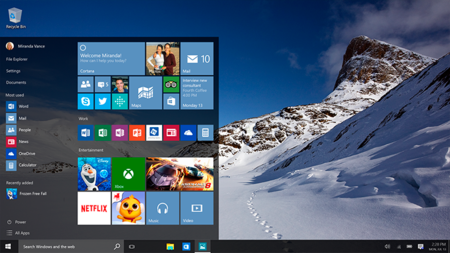
For users familiar with Windows desktop environments, the user interface will be recognizable. This simplifies server administration and configuration for those with experience in Windows environments.

- Simple integration with Microsoft services:
A Windows VPS integrates seamlessly with other Microsoft services, such as Active Directory, SharePoint, Exchange, and Microsoft 365. This can simplify user management, authentication, and collaboration.

- Specialized technical assistance:
By opting for a Windows VPS, you can take advantage of the specialized technical support provided by Microsoft. This can be crucial if you are facing specific problems related to the operating system or Microsoft applications.

- Development in Windows environments:
If you are developing applications intended to run in Windows environments, having a Windows VPS offers a test environment that is more faithful to the production environment.

- Ease of use for non-technicians:
For those without advanced technical experience, Windows is often considered easier to use and manage compared to some Linux-based operating systems.

- Compatibility with Microsoft web technologies:
If you are using Microsoft-specific web technologies, such as IIS (Internet Information Services), a Windows VPS is essential for running and managing web applications based on these technologies.

- Known administration tools:
Windows provides administration tools, such as Server Manager and Control Panel, that are familiar to administrators working in Windows environments.

- Support for business applications:
Many business applications are designed to run in Windows environments. A Windows VPS ensures compatibility and optimal performance for these applications.

- Easy remote access:
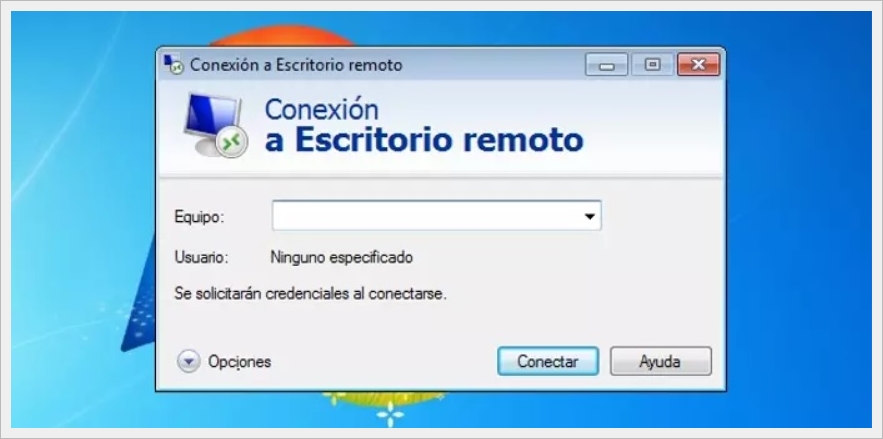
Windows offers remote access tools, such as Remote Desktop, that make it easy to manage your server from any location.

It is essential to consider these advantages based on your specific needs and requirements. While a VPS with Windows operating system is ideal for certain use cases, the choice between Windows and Linux will ultimately depend on your applications, skills and preferences.


SELECT YOUR WINDOWS VPS

hostingred

VPS Windows 1
  • We Help You Maximize the Performance of Your Applications.

GONNA HOSTINGRED

VPS Windows 2
atlantic


  • Fast, flexible and fail-safe Windows server hosting.

GONNA ATLANTIC

VPS Windows 3
hostdime

  • In the United States our Virtual Servers guarantee optimal performance and effective support.

GONNA HOSTDIME

strato

VPS Windows 4
  • Powerful Windows virtual servers with lots of RAM.

GONNA STRATO

VPS Windows 5
truobox

  • Cheap VPS the best price-quality ratio in Latin America.

GONNA TRUOBOX

VPS Windows 6
dongee

  • Faster than your competition with dongee.

GONNA DONGEE

¿What is a Windows VPS?


If you are wondering what is a vps?, what is vps?, what are vps? or what is vps?, here at webhostingfreecpanel.com we help you with these questions, A VPS “Virtual Private Server” is a virtualized operating system in the cloud where you can access from anywhere, a vps can have any operating system, everything goes Focused on what you need, the operating systems that are regularly offered are: Windows vps, Linux vps, Windows server vps. The user who purchases a vps has root access to install all the programs they need depending on the operating system that the vps has, you can also run your vps from any device, be it cell phones, tables and computers.

¿What is a Windows VPS for?


A vps with Windows gives you the ease of managing all the programs that you use in your operating system such as office, antivirus, accounting systems, etc., several people can log in simultaneously to your vps and work without problems, keep in mind that the more people log in Your VPS can get slower, so the capacity and performance of the VPS you want to purchase is important. You can also configure your local printer and from your Windows VPS you can print what you need.

Features of a Windows VPS:


• Share local resources such as the printer between your PC and your Windows vps or Windows vps server.
• Compatibility of all the programs that you use in Windows with your Windows vps, such as office, applications or third-party programs.
• If your computer turns off you don't have any problem since Windows vps are always available 24/7.
• The features of your Windows vps and/or Windows vps server are scalable, you can gradually increase performance like webhostingfreecpanel.com, RAM and space.

VPS with Windows


Windows Virtual Server

With us VPS with Windows you can create all the user accounts you need and access multiple people at the same time with VPS Windows 10, You can also access from any mobile device such as cell phones or tablets, you can change passwords or generate user blocks, you can also set up email servers with your own domain so you can send and receive emails and store them on your server. VPS Windows, with your VPS Windows 10 you will have all the tools you need.

VPS Windows Colombia and the United States

When purchasing a VPS Windows Colombia and the United States It is much cheaper and has all the features of a VPS Windows server so you can mount all your applications and files, also with your VPS with Windows will have security systems to protect your account and files, you can access with your multi-user account so that several people can access the same application at the same time, get your Windows virtual server and optimize the performance of your tasks.

VPS with Windows

With your VPS with Windows You can set up web pages and applications so that your clients can enter and have sales opportunities with your portfolio, there are many advantages that a VPS with Windows can offer you, we have economical and fair plans for you to start your projects and maximize your work and that of your company, you can also set up your databases thanks to the fact that VPS Windows server is compatible with databases such as MySQL, SQL among others.

Additional VPS Windows Server Tools

VPS hosting Colombia and the United States


In your VPS Colombia and the United States you can set up your hosting server “VPS hosting” with all the dedicated resources of your server, this will allow you to set up your websites, database, java hosting, ftp accounts and all the tools that it normally has a web hosting, you can also set up all the domains and subdomains you want, emails and much more, this will allow you to have your own dedicated hosting.

Dedicated Windows VPS access


To access your Windows VPS from your Windows computer, you do not need external programs, you just need to start Windows and type “remote desktop connection” and then write your credentials for your dedicated VPS and that's it, in the case of a MAC you must Go to the Apple Store and download Microsoft Remote Desktop and then enter our VPS credentials and that's it.

Multi-user Windows VPS accounts


With our Windows VPS plans you will be able to log in simultaneously with all the users that you allow and need to log in to your Windows VPS either to work on specific software such as an accounting system, this will allow you to create login sessions per user allowing everyone to work. independently on your VPS Windows Server or VPS Windows.